
PETS Pony Land Guides Hub
Species, looks, crafting, flowers, exploration, controls, and emotes in one place.
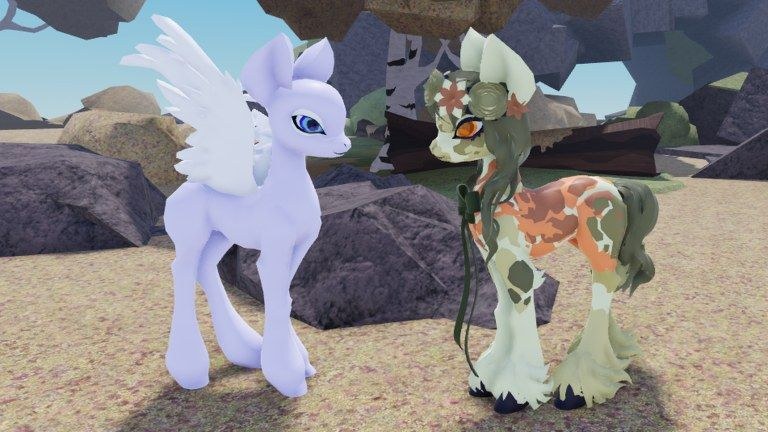
Welcome to the Guides Hub for PETS! Pony Land on Roblox. Faded Horizons launched this MLP-inspired experience into BETA on 2026-07-27. You create an Earth pony, Pegasus, or Unicorn, customize hundreds of body parts, eyes, manes, and tails, mix coat patterns, collect accessories and hats, switch dynamic idle/wing/tail animations, and save up to three skins per species. Servers support online play with up to about twenty players. As of the mid-November 2026 research pass the place sits around ~1.3M visits and ~27k favorites, with a fresh Roblox update stamp near 2026-11-13—still early access, still evolving.
This hub is the map of every how-to on the wiki. Use it when you need a first-hour checklist, a species comparison, a deep customization walkthrough, a crafting guide, dedicated Flowers or Exploration help, or controls and emotes tips. Each guide is written for real BETA play—not filler—and cross-links siblings so you never dead-end after one article.
Start here if you are new
Open Getting Started before anything else. That page walks your first session: join the experience, pick a species, open inventory, learn the map loop, gather early resources, and save a look you like. It also points at inventory habits that keep crafting and accessories painless later.
If you already know the basics but feel stuck choosing a pony type, jump to Species. Earth, Pegasus, and Unicorn each change silhouette, animation options, and the vibe of your screenshots. The species guide helps you decide without treating any type as “required.”
Customize, craft, explore, and express yourself
Deep looks live in Customization. That guide covers body parts, eyes, manes, tails, coat patterns, accessory placement, animation styles, and the three save slots per species. Treat slots like outfits: one daily explorer, one formal or event look, one experimental palette.
World systems sit in Accessories and Crafting. Explore to gather resources, craft rarer items, and fit hats cleanly. Blooms are real gameplay signals—read the dedicated Flowers guide when petal patches feel mysterious, then spend materials with craft discipline. Full map habits, landmark memory, and gather etiquette live in Exploration so you stop racing past useful nodes.
Movement and social flair belong in Controls and Emotes. Use it for PC and mobile tips, emote timing, and how idle, wing, and tail animation styles make your pony feel alive while you hang out or explore. Soft hangout manners pair well with Roleplay Tips on the Players hub.
How to use this hub
- Skim the guide list below and open the page that matches your current goal.
- Follow internal links mid-article; sibling guides answer related questions without sending you back to the home page.
- After a BETA patch, re-check Updates and November 2026 Update, then return here if a mechanic changed.
- Keep Codes bookmarked for promo rewards, and Players if you track creators or roleplay habits.
- Official and community destinations live under Links when you need the Roblox page or socials.
Guide index
- Getting Started — first-hour checklist, inventory, species pick, early explore loop.
- Species — Earth pony, Pegasus, and Unicorn differences and how to choose.
- Customization — parts, patterns, animations, and save slots.
- Accessories and Crafting — gather, craft, hats, and fit adjustments.
- Flowers — why blooms matter, how to interact, meadow etiquette.
- Exploration — landmarks, gather routes, and map habits that fund crafts.
- Controls and Emotes — movement, emotes, PC/mobile tips, animation styles.
Play loop at a glance
PETS Pony Land rewards curiosity more than a rigid quest checklist. A healthy session looks like this: load a saved skin, explore a new corner of the map, pause in flower zones with intent, gather what you find, craft when you have materials, try a new accessory or pattern, swap an idle or wing style, then emote with other players. If something feels unclear, return to the matching guide instead of guessing. BETA means menus and item pools can shift; the guides focus on durable habits—save often, label slots mentally, gather before you craft, and screenshot looks you love before you overwrite them.
When you finish a guide, skim the FAQ on that page, then hop to a sibling. Customization pairs with species and accessories. Crafting pairs with getting started, flowers, and exploration. Emotes pair with controls and animation notes inside customization. That web of links is intentional: the wiki should feel like a stable you can walk through, not a pile of isolated tips.
Related hubs outside Guides
- Codes — redeemable rewards when the team publishes them.
- Updates — patch tracking, including the November 2026 status check.
- Tier List — opinion rankings when the community compares looks or routes.
- Scripts — only use trusted sources; never share account details.
- Players — creators, community spotlights, and Roleplay Tips.
Stay curious, save your favorite skins, and treat flowers as gameplay—not scenery. When you are ready for the first session checklist, open Getting Started next.
Frequently Asked Questions
Quick answers to the most common questions.
Which guide should I open first in PETS Pony Land?
Start with Getting Started for the first-hour checklist. Then read Species if you are undecided, or Customization if you already picked a pony type.
Is PETS Pony Land still in BETA?
Yes. The experience entered BETA on 2026-07-27. Mid-November 2026 research still shows early access with ~1.3M visits and ~27k favorites; re-check Updates after patches.
Do these guides invent promo codes?
No. Codes belong on the Codes hub only when the developers publish real rewards. Guides never invent codes or fake YouTube videos.
How many skins can I save?
You can save up to three different skins for every species. See the Customization guide for slot strategy tips.
Where do flowers and crafting fit?
Read Flowers for bloom purpose and etiquette, Accessories and Crafting for gather-to-craft spending, and Exploration for map routes that feed those systems.