
PETS Pony Land Pony Customization Guide
Body parts, patterns, animations, and three save slots per species.
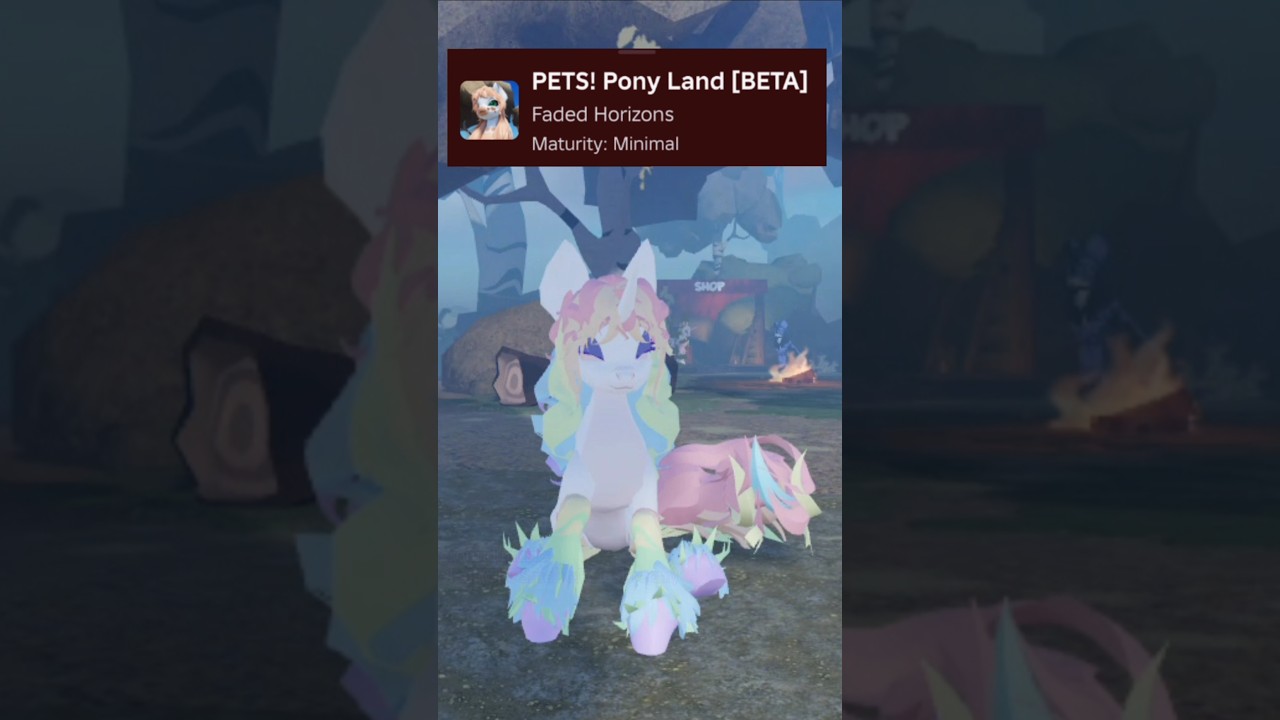
Customization is the heart of PETS! Pony Land. Faded Horizons built an MLP-inspired sandbox where hundreds of body parts, eyes, manes, and tails combine with unique coat patterns, accessories, hats, and dynamic idle, wing, and tail animations. You can save up to three skins for every species, which means Earth pony, Pegasus, and Unicorn each get their own wardrobe of looks. This guide shows how to work those systems without drowning in menus, how to keep patterns readable, and how to use save slots like a designer instead of overwriting your favorite pony by accident.
New players should finish Getting Started first. If you still need help choosing a type, read Species beside this page. Accessories, hats, gathering, and flowers continue in Accessories and Crafting. Animation flair and emotes pair with Controls and Emotes. The full index lives on the Guides Hub.
Open the right panels
Enter the experience, open Inventory, and locate the customization flow for your active species. Expect separate concerns even if the UI groups them tightly:
- Body structure — proportions and part variants that define silhouette.
- Eyes — shape, color, and expression readability at distance.
- Manes and tails — style meshes plus color stories that frame the body.
- Coat patterns — overlays and region colors that sell the character fantasy.
- Accessories and hats — collectible flair with placement/adjustment.
- Animation styles — idle, wing, and tail motion sets that play while you stand or move.
Work top-down: silhouette first, then face, then hair volumes, then pattern, then props, then motion. Jumping straight to a busy hat on a muddy palette usually creates noise instead of a character.
Body parts and silhouette
Start with the body parts that change outline the most. A chunky Earth pony read differs from a sleeker Unicorn or winged Pegasus even before color. Zoom the camera out after every major part swap. If the pony looks confusing as a tiny thumbnail, simplify. Roblox screenshots and server distance punish ultra-fine detail that only looks good in a cropped close-up.
When you try a new part, toggle between a neutral pose and a slight turn. Some meshes clip with certain manes or wings. Prefer parts that stay clean across idle animations—you will spend a lot of time standing in social circles.
Eyes that read in a crowd
Eyes carry personality faster than any accessory. High-contrast irises help other players see your expression during emotes. Extremely dark-on-dark or neon-on-neon combinations can smear on lower graphics settings. Build two eye setups in your notes (even mental notes): one everyday readable pair, one dramatic pair for screenshots. Because you only have three save slots per species, you may keep dramatic eyes on the “fancy” slot rather than your explorer default.
Manes, tails, and color stories
Manes and tails should share a color story with the coat, not fight it. Pick a primary, a secondary, and an optional accent. Apply the accent sparingly—streaks, tips, or a single ribbon-like accessory. If mane and tail use totally unrelated palettes, the pony looks like two characters stacked together.
Test mane volume against your species traits. Tall Unicorn horns and wide Pegasus wings need clearance. If a fluffy mane swallows the horn or clips through wings during idle cycles, swap to a tighter style or rearrange colors so the eye still finds the face.
Coat patterns without mud
Pony Land advertises unique patterns you can mix with custom coat colors. Patterns shine when regions stay distinct. Mud happens when every region uses mid-value pastels of similar brightness. Fix mud by:
- Choosing a clear base coat.
- Applying one hero pattern rather than stacking every option.
- Pushing value contrast (light base / darker markings, or the reverse).
- Checking the pony in motion—some patterns shimmer differently under dynamic idle loops.
Save a “pattern lab” idea on slot 3 if you like to experiment. Keep slot 1 conservative so you always have a clean explorer look after a wild session.
Accessories, hats, and fit
Collect accessories and hats from the world, then adjust them so they sit correctly on the mesh. A tilted hat that looked cute in the menu can clip through ears once wing animations start. After equipping anything new:
- Rotate the camera around the head and withers.
- Trigger idle and tail styles.
- Walk a short distance to see bobbing and bounce.
Deep gather and craft loops for earning those items live in Accessories and Crafting. This page only covers how they finish a look.
Dynamic idle, wing, and tail animations
Motion is part of customization, not an afterthought. Switch idle styles until the personality matches the coat. Soft sways fit gentle pastel ponies; snappier loops fit bold graphic patterns. Pegasus players should audition wing styles with their mane volume. Unicorn and Earth pony players still benefit from tail style variety during emotes and AFK standing.
Pair animation choices with Controls and Emotes so movement inputs and emote timing support the vibe you built in the editor.
Save slots: three skins per species
The official feature list is explicit: save up to three different skins for every species. Treat that as nine potential looks across Earth, Pegasus, and Unicorn—not three total.
Suggested slot policy:
| Slot | Role | Notes |
|---|---|---|
| 1 | Daily explorer | Readable colors, light accessories, reliable animations |
| 2 | Social / formal | Hats, richer patterns, screenshot-ready eyes |
| 3 | Lab | Wild palettes, experimental parts, safe to overwrite |
Before overwriting any slot, screenshot it. BETA updates can change menus; your gallery backup is insurance. When you switch species, confirm you are editing the correct species’ slot bank so you do not assume an Earth look transferred to Pegasus automatically.
A practical customization workflow
- Load slot 1 or an empty slot intentionally.
- Lock silhouette and species traits.
- Set eyes for readability.
- Choose mane/tail pair with a three-color story.
- Add one pattern pass; stop if contrast drops.
- Equip at most one hero accessory plus optional small flair.
- Pick idle/wing/tail styles and walk-test.
- Save, screenshot, then optionally copy ideas into slot 2.
If you feel stuck, revert to a simple two-tone coat and rebuild. Complexity is easier to add than to untangle.
Cross-links while you design
- Unsure which fantasy fits you? Species.
- Need materials for hats and rare flair? Accessories and Crafting.
- Want smoother camera and emote timing? Controls and Emotes.
- Still onboarding? Getting Started.
- Need the full list? Guides Hub.
Customization in Pony Land is less about unlocking a single meta outfit and more about building a small wardrobe that still looks intentional on a live server. Keep slot 1 sacred, experiment on slot 3, and let patterns breathe. When your pony reads clearly from a medium camera distance—and still feels like you—you are done enough to go explore.
Frequently Asked Questions
Quick answers to the most common questions.
How many pony skins can I save?
Up to three skins for every species. Earth pony, Pegasus, and Unicorn each have their own set of three slots.
What order should I customize parts?
Silhouette and body parts first, then eyes, mane and tail, coat pattern, accessories, and finally idle, wing, and tail animation styles.
Why do my colors look muddy?
Similar mid-value colors across base coat and pattern regions reduce contrast. Increase value difference and limit yourself to one hero pattern pass.
Should every look use hats and accessories?
No. Keep a clean daily look for readability, then add hero accessories on a social or formal save slot after you walk-test for clipping.
Do animations count as customization?
Yes. Dynamic idle, wing, and tail styles change how the pony feels in-world and should be walk-tested with your mane, wings, and hats.